DOMINATE YOUR
LOCAL MARKET
The offline alternative to expensive fleet data...
Upgrade to Instant Visual Intelligence.
TRUCKERINTELLIGENCE is Windows desktop software that turns Federal Motor Carrier Safety Administration (FMCSA) census data into local fleet lists and trucking sales leads for dealership and OEM sales teams. Visually scout territories with MAPINTEL , isolate targets with FLEETFOCUS , and execute your sales offensive with the integrated ACTIVITYHUB .
System Capabilities
Nationwide Command | Precision Filtering Engine | Unrestricted Access
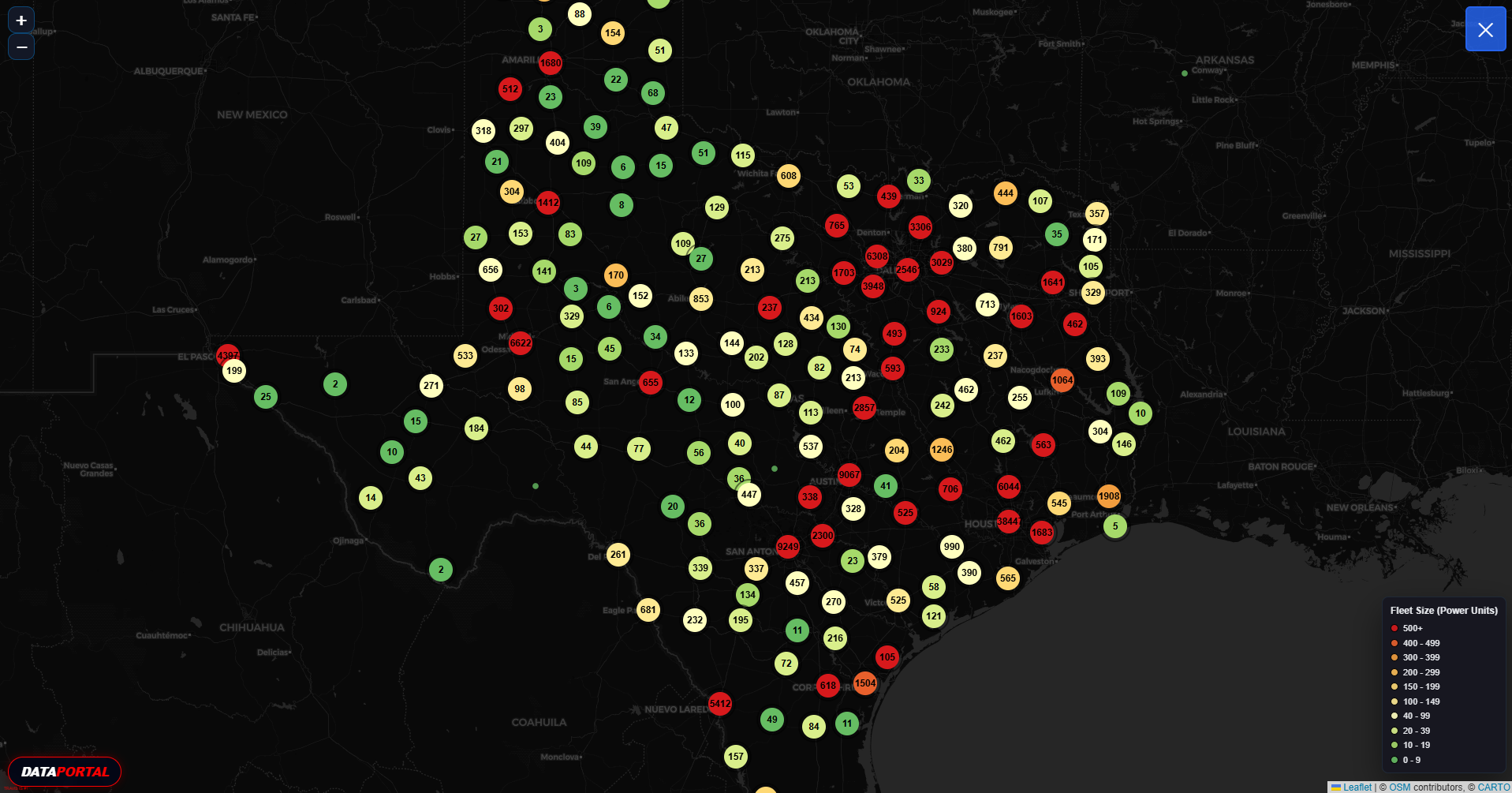
MAPINTEL
Visual ReconMacro-to-Micro Visibility
MAPINTEL turns the FMCSA census into a territory map that shows where fleets sit, not just where they are registered. Pins cluster by fleet size and density, so you see anchor accounts, coverage gaps, and freight corridors before you make a single call. Start at a state-wide strategic view, then work down through metro areas to individual zip-code centroids while the legend and fleet counts stay in sync. The result is macro-to-micro visibility over the entire market.
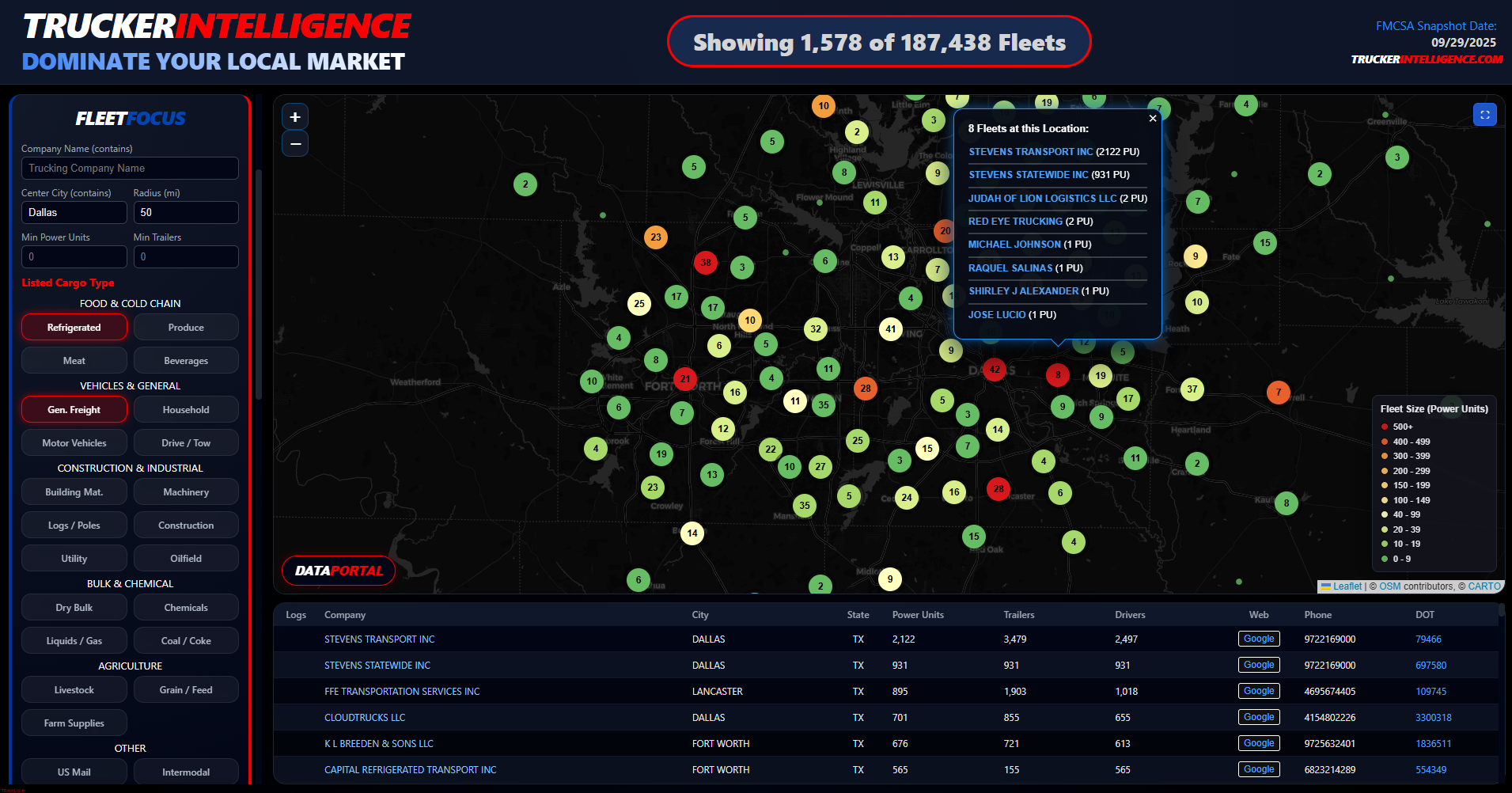
FLEETFOCUS
Targeting Engine2.2 Million Record Database
FLEETFOCUS sits on top of the 2.2 million record FMCSA census and cuts it down to the part of the market you can work. Filter by company name, center city and radius, power units, trailers, drivers, operation type, and listed cargo such as refrigerated, flatbed, dry van, construction, or chemicals. Every change reshapes both the table and MAPINTEL against the same filtered set, so the list, the map, and the fleet counts all describe one precise territory slice.
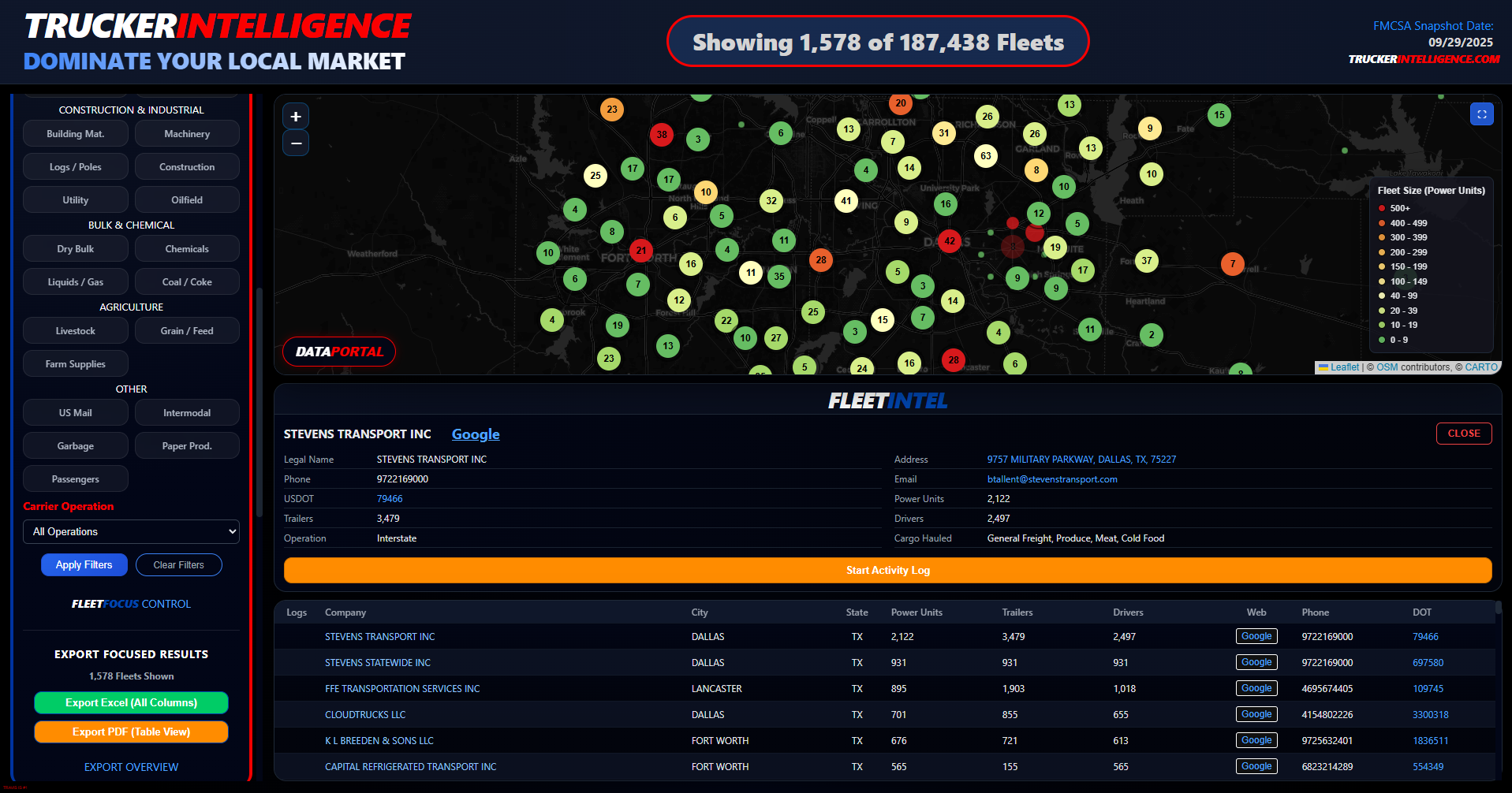
FLEETINTEL
Account DetailTotal Operational Profile
FLEETINTEL converts each row in the table into a working account file. Legal and doing-business-as names, address, city, state, ZIP, phone, operation type, cargo hauled, power units, trailers, and driver counts sit in one panel with links out to Google, FMCSA, and SAFER. From the same screen you can start or reopen an ACTIVITYHUB log, review prior history, or launch DATAPORTAL for deeper research, so every call begins with a complete picture of the fleet.
Click Images to Enlarge
Map locations are approximate.
Pins do not represent exact facility addresses.
Pins are placed using ZIP-code centroids based on the ZIP reported to FMCSA; when a ZIP is invalid or missing, the pin is placed at the primary ZIP for the reported city.
For precise location and directions, click the FMCSA-reported address in the app to open Google Maps in the In-App browser at the exact street address.
DATAPORTAL
Integrated Intelligence Links | In-App Browser | Contained Web Access
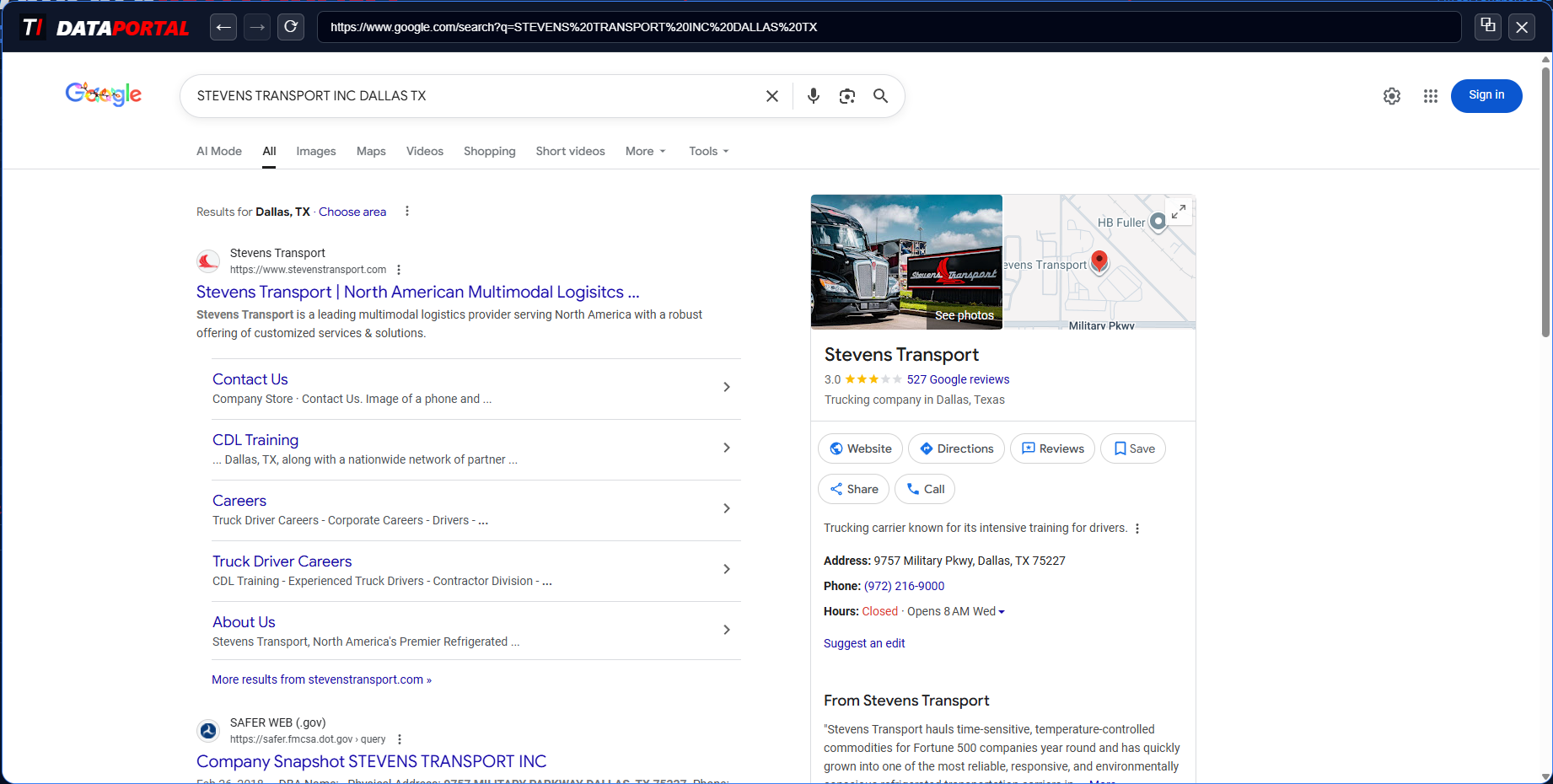
DATAPORTAL - Google Search
Live Web ReconAutomated Prospect Research
From the FLEETINTEL detail panel or the main table, click the Google control and DATAPORTAL builds a targeted search for the fleet’s name, city, and state inside the in-app browser. Use the DATAPORTAL button on the map for territory-wide scans, or the FMCSA Census and TruckerIntelligence.com hotlinks for fast access to reference sites. You get live web results while your filters, map, and account details stay locked in place beside the research pane.
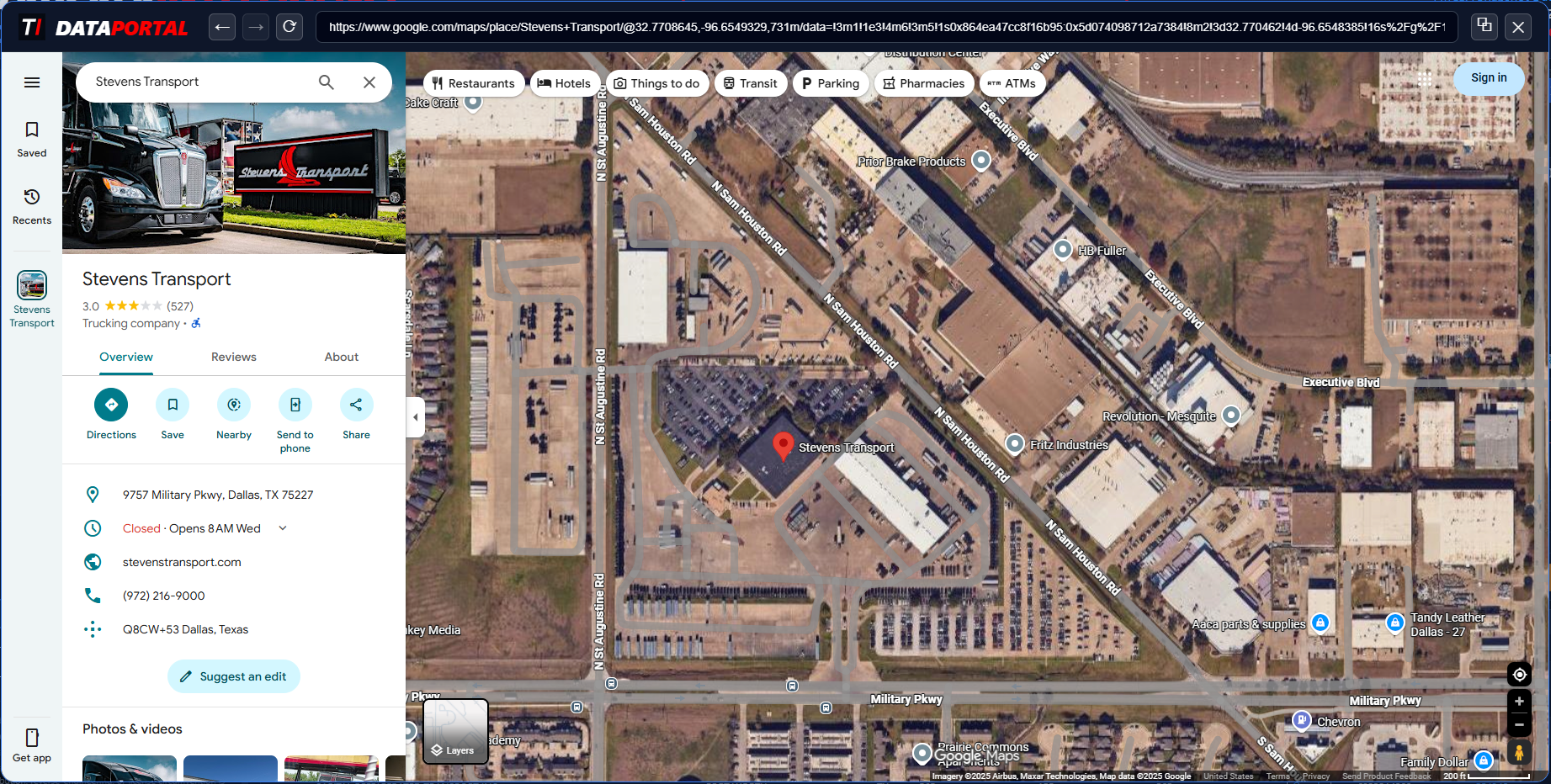
DATAPORTAL - Google Maps
Satellite VerificationOne-Click Site Verification
Click the FMCSA-reported address in FLEETINTEL and DATAPORTAL launches Google Maps in the same secure frame. Confirm that the location is a terminal, office, or yard, review access routes, and size up the lot from satellite before you ever drive there. Directions, nearby streets, and landmarks stay in the in-app browser so you can study the site without leaving your territory view or breaking focus on the current account.
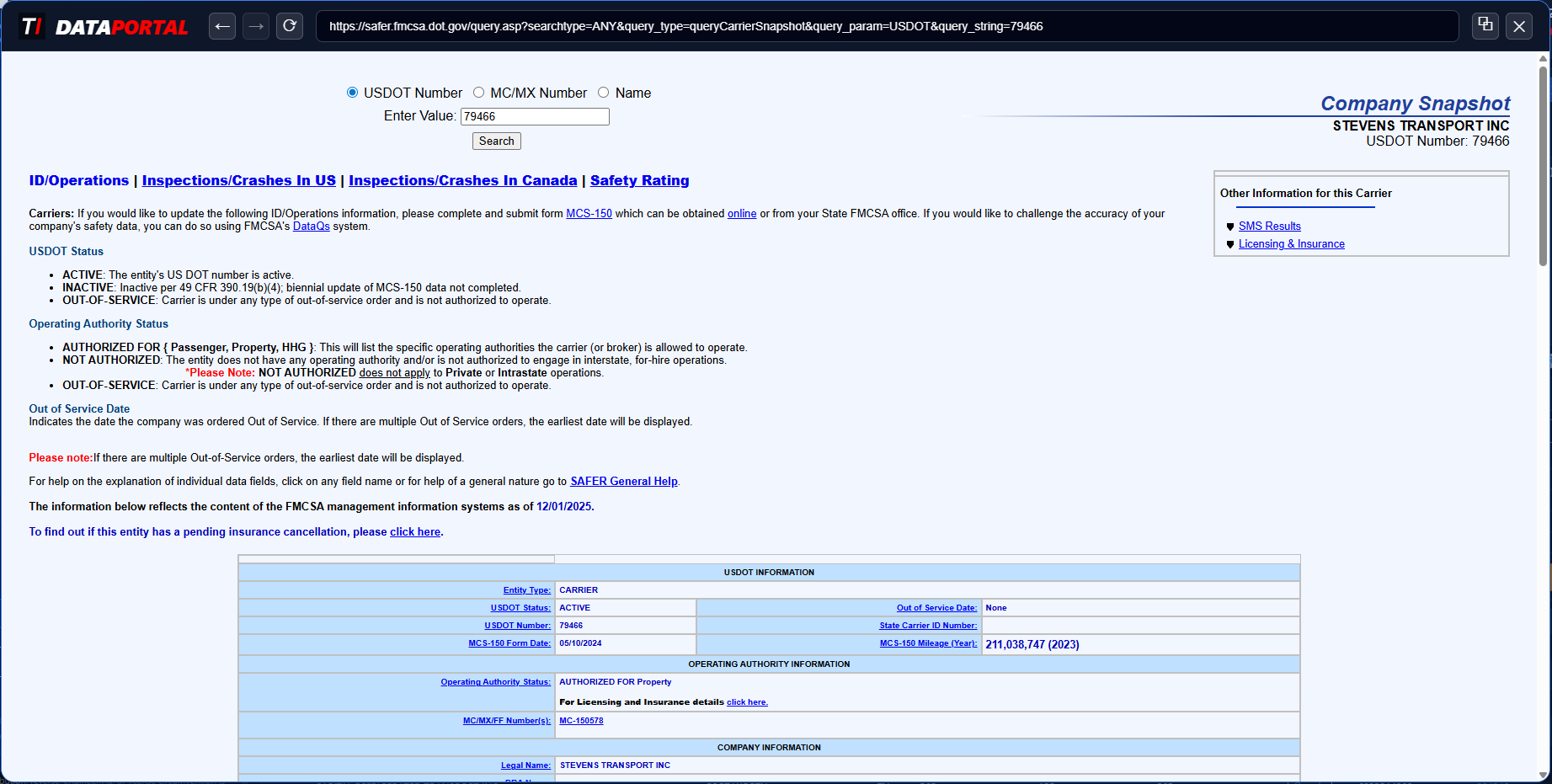
DATAPORTAL - FMCSA SAFER Web
Regulatory SnapshotDirect Federal Data Link
When you click a DOT number in the table or FLEETINTEL, DATAPORTAL opens that carrier’s live FMCSA SAFER Web page. Review authority status, cargo classifications, inspections, crashes, and out-of-service metrics directly at the federal source without retyping IDs. Because the SAFER view sits beside your filters and ACTIVITYHUB history, you can align federal data with your own account notes in a single working screen.
Click Images to Enlarge
TruckerIntelligence includes a built-in browser for quick lookups and verification inside the app.
Most sites will display similar to a modern desktop browser, but some features (extensions, saved passwords, custom profiles, or corporate security add-ons) may not be available here.
The in-app browser uses its own session and does not reuse your personal browser history or stored passwords from Chrome, Edge, or other browsers.
For workflows that work better in your normal browser, use "Open in Default Browser" to launch the current page in your system’s default browser.
Features, such as the embedded web browser, FMCSA SAFER lookups, license
activation, and software updates, require an internet connection and may communicate directly
with third-party sites you choose to access.
ACTIVITYHUB
Only Available in Black Edition | Single Activity Stream | Complete Market Control
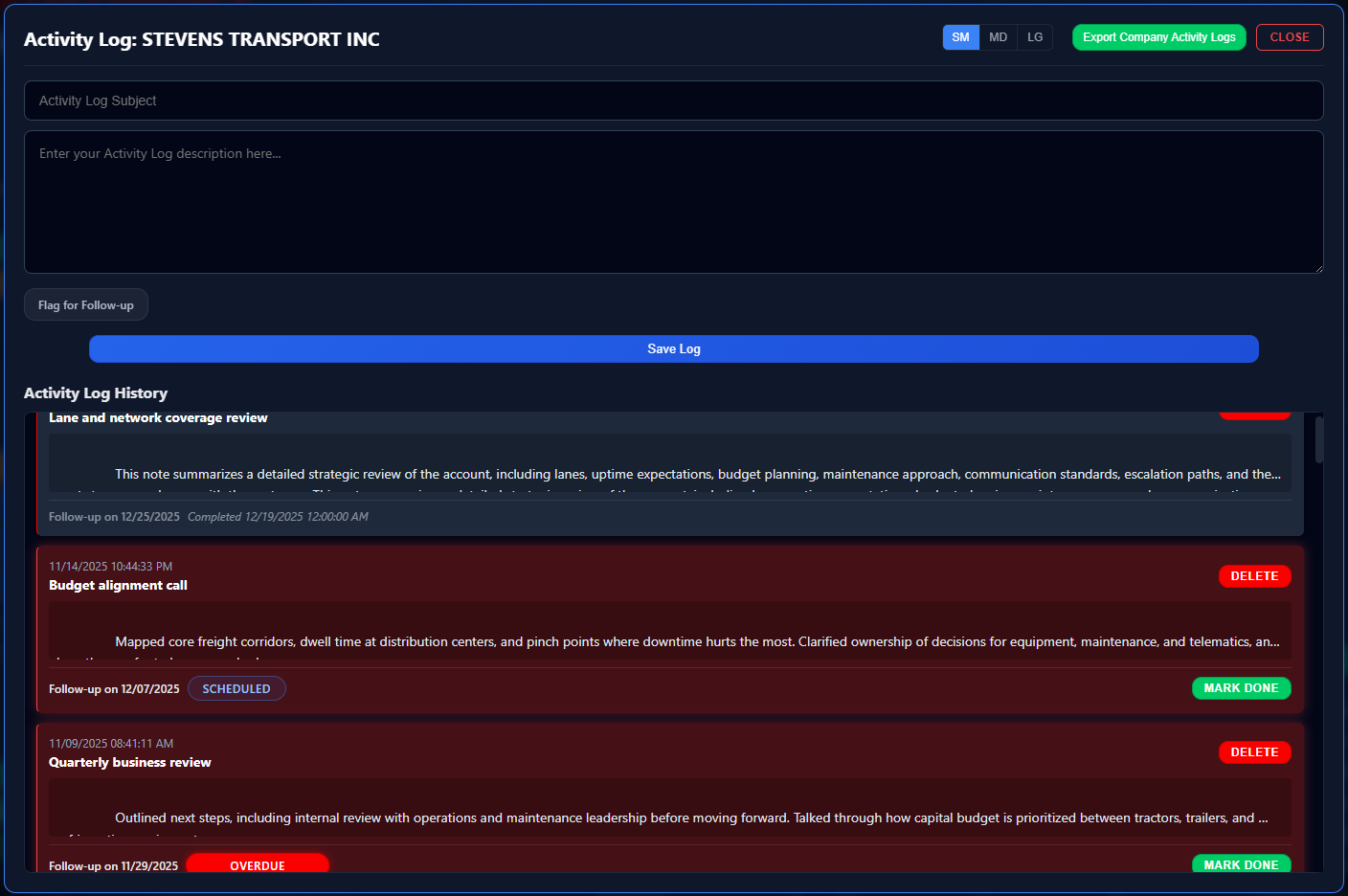
Lightweight Sales CRM
Rapid Activity LoggingFollow-Up First Logging
ACTIVITYHUB turns every conversation into a structured account log instead of scattered notes. Enter a subject and long-form description, flag the note for follow-up, and set the date in one motion. Each log is time-stamped and stacked into a single timeline for the fleet, with color-coded bands that show overdue, scheduled, and completed follow-ups at a glance. Reps get a lightweight CRM that moves at the speed of a sales call, without the admin drag of a full enterprise system.
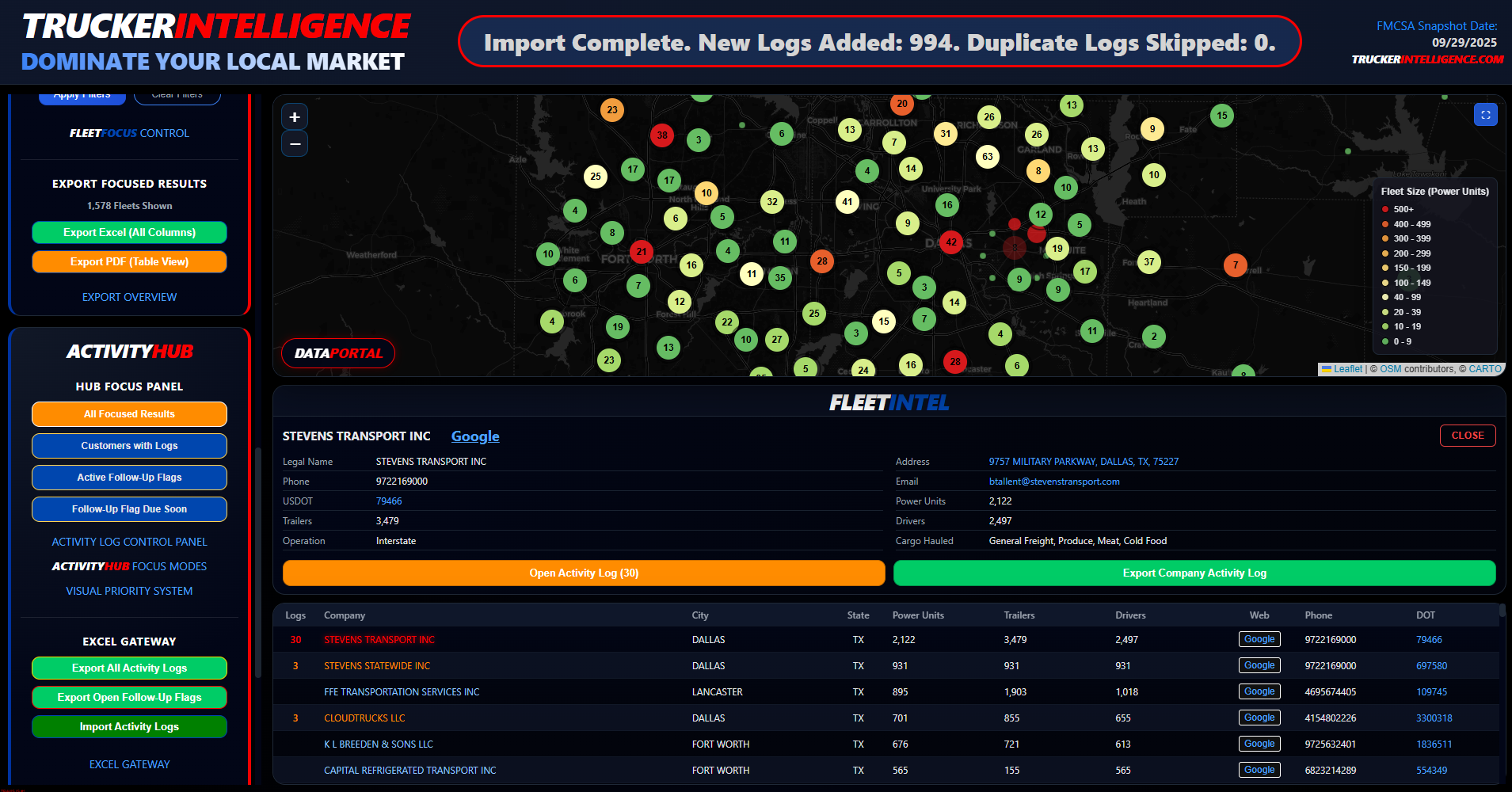
HUB Focus Panel
Visual Priority SystemSingle Stream for the Whole Market
The Hub Focus Panel rolls every log into one territory-wide activity stream. Toggle between All Focused Results, Customers with Logs, Active Follow-Up Flags, or Follow-Up Flags Due Soon and watch the map, FLEETINTEL account panel, and fleet table all snap to that slice of the market. Instead of guessing who to call next, reps work straight from a prioritized list of fleets with open flags and recent conversations, while leadership can see where activity is actually happening on the map.
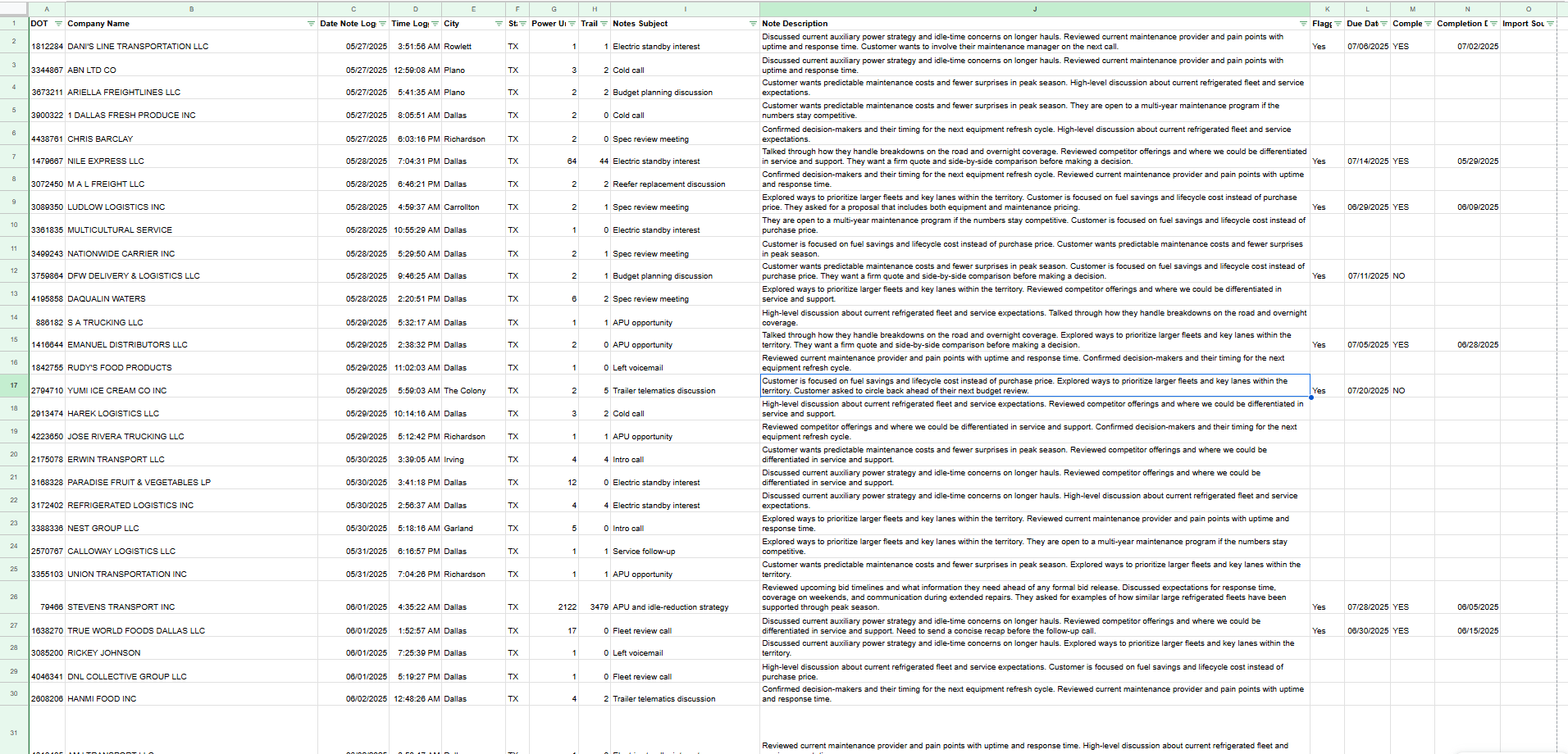
Excel Gateway
Team Intel SyncImport / Export Engine
One click exports every ACTIVITYHUB log to Excel through the built-in Excel Gateway. The file carries DOT, company, city, state, power units, trailers, log subject, full note description, follow-up flags, due dates, completion status, completion time, and import source for each entry. Use it for weekly reporting, pipeline reviews, coaching, territory hand-offs, or to feed a corporate CRM. Reps keep the fast, lightweight logging they like; management gets a clean, auditable dataset for the entire market.
Click Images to Enlarge
ACTIVITYHUB LIVES INSIDE TRUCKERINTELLIGENCE, SO NOTES STAY WITH THE TERRITORY DATA THEY CAME FROM. SALES TEAMS CREATE LOGS STRAIGHT FROM THE MAP OR TABLE, FLAG FOLLOW-UPS, AND SEE THE SAME LOG COUNTS ROLL UP AT THE COMPANY LEVEL IN FLEETINTEL. THE EXCEL GATEWAY THEN PUSHES EITHER ALL LOGS OR ONLY OPEN FOLLOW-UP FLAGS INTO A FLAT FILE THAT CAN BE DROPPED INTO YOUR EXISTING REPORTING STACK. THE RESULT IS A PRACTICAL, SALES-FIRST ACTIVITY SYSTEM THAT STILL PRODUCES STRUCTURED DATA FOR LEADERSHIP. Excel exports are provided for reporting and backup and may be imported into your corporate CRM subject to your internal policies and data standards.
Why TRUCKERINTELLIGENCE?
Complex fleet data made simple.
No cloud. No monthly fees. Just intel.
20 Years of Real-World Experience
This isn’t Silicon Valley. This is real dealership knowledge, built by someone who understands the grind.
TruckerIntelligence is an American-built tool forged from 20+ years inside dealership sales and operations.
I didn’t build this in a glass Silicon Valley office. I built it because I know the struggle of blind prospecting, chasing AOP without visibility, and wasting time hunting for fleets the hard way.
I built this for my own team first.
Now I’m giving it to you so your team can stop guessing and start owning your market.
Map Intelligence
See fleet data the way your brain works. Traveling to an unknown area? Hit radius mode and see every prospect within seconds. Sales meetings become strategic instead of blind.
Instant Google Lookup
Stop Copy/Paste prospecting. Every company has a one-click Google search in the popup. Phone numbers wrong? Need a contact? Find the real info instantly. Your reps will think it's magic.
Filter By What Matters
Radius, Power Units, City, Cargo Type, Trailers. Stop wasting your time with fleets that don’t buy Reefers or Dry Vans. Find the right customers - fast.
Hyper-Fast Performance
No Cloud. No Lag. No Waiting. Everything runs locally on your machine. Load 300k+ fleets in seconds with no dependency on slow web servers. Your data never leaves your computer.
Export-Ready Data
Perfect for CRM, meetings, and leadership reviews. Filtered lists export instantly to Excel or PDF. Walk into meetings with accurate lists, not guesses.
Local-Only. No Cloud. No Leak.
TruckerIntelligence runs on your machine, not in someone else’s data center. No logins. No tracking. No hidden sync.
Competitors and vendors don’t see where you hunt or who you’re targeting. Your market intelligence stays where it belongs: inside your team.